 EN
EN
 FR
FR
 JA
JA
 RU
RU
 ES
ES

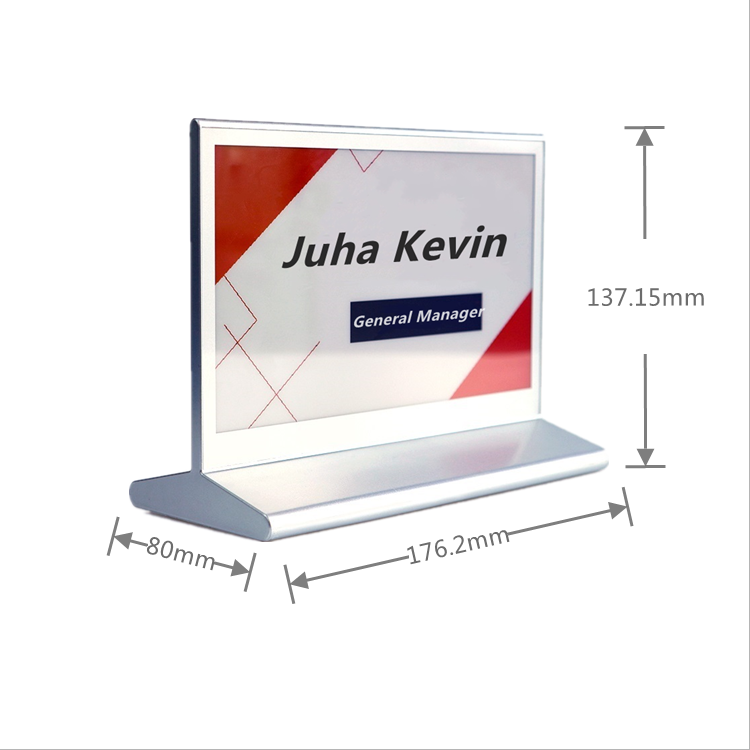
Overview of the Electronic Conference Nameplate System
The electronic conference nameplate boasts an elegant and sophisticated design, completely replacing traditional plastic, paper, or brass nameplates. It represents a significant innovation in conference table display equipment. Compared to conventional nameplates, it offers high levels of digitalisation and is reusable, making it an ideal tool for modern, information-driven conferences. It integrates, optimises, and modernises traditional conference equipment and procedures. Under the premise of high cost-effectiveness, it enables a one-time investment for long-term, stable use, achieving the most economical objective. It enables truly paperless proceedings throughout the entire meeting, conserving resources and supporting environmental sustainability.
Product Advantages
Supports customisable templates;
Rapid updates, typically achieving data transmission within 1-3 seconds;
Supports screen control via PC backend or mobile application;
Updated images incorporate jittering algorithm;
Supports firmware updates for enhanced functionality and innovative applications;
Web-based application interface enabling cross-platform operation;
Ultra-low power consumption, typically delivering 3-5 years battery life/recharge cycle;
Wireless communication rates of 50/250kbps, unimpeded by obstacles with exceptional penetration capability;
Dot-matrix electronic paper display, dual-sided high-definition visuals for natural viewing with near 180° viewing angles;
Customisable bidirectional communication protocol, secure and reliable with simple rapid deployment requiring no cabling;
Supports global deployment, ready for immediate use without installation;
Supports over-the-air wake-up, rapid refresh efficiency with an intuitive operating interface.
Table Nameplate Management System Operational Procedure
Login to the Table Nameplate Management System: http://47.192.168.1.171/
Step One: Click the designated link to access the Table Nameplate Management System
Step Two: Navigate to the "Meeting Management" module and select "Add Meeting" to complete meeting creation
Step Three: Select the appropriate template type, add nameplates and assign corresponding table locations
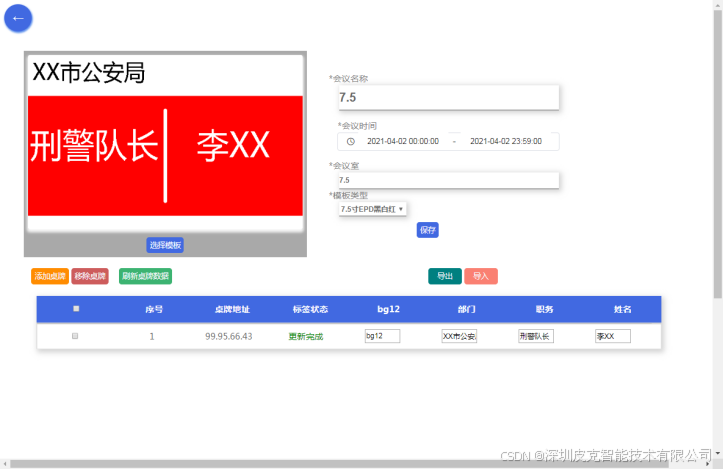
Step Four: Refresh the table card data to complete the initial configuration.
Step Five: Directly modify the required content for the table cards within the system interface.
Step Six: Click Update to synchronise the displayed content on the conference table cards.
Daily Quick Modifications
Routine modifications can be swiftly completed by executing Steps Five and Six only. For bulk adjustments to table card content, export the Excel spreadsheet via the system, edit it as required, then import it back into the system for efficient and convenient processing.